
-

Announcing What'sBest, LINGO and LINDO® API new releases with faster solvers and new features.
-

What'sBest! 20 - Excel Add-In for Linear, Nonlinear, and Integer Modeling and Optimization
-

LINGO 22 - Optimization Modeling Software for Linear, Nonlinear, and Integer Programming
-

LINDO® API 16 - Powerful Library of Optimization Solvers and Mathematical Programming Tools
-

Our customers
-

Our customers
-

Our customers
-

Our customers
- 1
- 2
- 3
- 4
- 5
- 6
- 7
- 8
-
What'sBest!
What'sBest! lets you build linear, nonlinear, and integer models in Excel. Models are easy to build and understand using standard spreadsheet equations.
LINGOLINGO is a comprehensive tool designed to help you build and solve linear, optimization models quickly, easily, and efficiently.
LINDO® APILINDO® API creates optimization applications. It allows you to plug the power of the LINDO® solver right into customized applications that you have written.
- 1
LINGO 22 Algebraic Modeling Language – New Features:
1) Solvers:
- Simplex solvers increase the average performance on large instances by 25-30%.
- MIP (Mixed Integer Program) solvers:
- From our standard benchmark suite, the number of models solved to optimality within 2hrs increased by 20% compared to the previous version.
- Improved support for external solvers such as COPT, Coin/CLP, Highs.
- Global solver has tighter linearizations and relaxations.
- Improved Random Number Generator. The `@RAND` and `@QRAND` functions now use a composite of linear congruential generators with a long period for enhanced pseudo-random number generation in the range (0, 1).
- Time to Best in Solution Report. The solution report now includes the Time to Best, the seconds of elapsed time to finding the best solution. This time is frequently << time to prove optimality of the best solution.
2) Excel Interface:
- Improvements to the Excel Add-in, so you can better run LINGO models from within an Excel spreadsheet.
- Import models directly from Excel into the LINGO editor.
- Push edits from LINGO back to Excel.
- Faster solution report generation on big models.
3) Editor Improvements:
- Double Hints - Quickly access context-sensitive information by double-clicking on sets, attributes, or variables anywhere in your model. Tooltips will display definitions, parent sets, or origin details depending on the element selected.
- Adaptive auto-complete capable of suggesting both LINGO methods frequently used words. For more helpful hints enable verbose auto-complete from the right-click menu.
- Improved editor UI with larger buttons, line numbers and an option to split model screens.
4) Visual Studio Code Add-ins:
- LINGO-LSP(Language Server Protocol in VS (Visual Studio) Code Add-in.
- Edit and run LINGO models within Visual Studio Code.
- Includes syntax highlighting, auto complete, hover documentation, and a run button with solutions summary.
- LINGO Copilot VS (Visual Studio) Code Add-in.
- Built on GitHub Copilot, this extension generates LINGO code from natural language or LaTeX descriptions.
- Can answer questions about LINGO documentation and generate contextual model comments.
Many of the new features in this release are due to suggestions from users. If you have more suggestions or questions, contact:
This email address is being protected from spambots. You need JavaScript enabled to view it.
LINDO Systems Inc.
(312) 988-7422
LINDO API 16.0 Optimization Solver – New Features:
1) LP (Linear Program) Solvers:
- New enhancements made to the simplex solvers increase the average performance on large instances by 25-30%.
2) MIP (Mixed Integer Program) Solvers:
- New heuristics at root node helps find good quality solutions for previously unsolvable instances.
- Enhancements in re-optimizations lead to optimality 15-20% faster compared to the previous version.
- From our standard benchmark suite, the number of models solved to optimality within 2 hrs increased by 20% compared to the previous version.
3) NLP (Nonlinear Program) Solvers:
- Interface to open source NLOPT solver suite.
- Improved performance due to better recovery strategies on difficult nonlinear problems.
- Improved Mult-Start solver based on entropy maximization.
- Global solver solution path repeatability improved.
- Improved linearization process and recognition of common terms.
- Tighter linear relaxations by incorporation of variable bounds.
4) Interfaces:
- Improved support for external solvers such as COPT, Coin/CLP, Highs
Who Can Benefit from CutsBest ?
Efficient material usage is critical across many industries where raw materials are cut into smaller pieces. CutsBest helps businesses reduce waste, minimize costs, and optimize production with advanced mathematical modeling. Below are some of the industries that benefit from our cutting optimization technology:
Industries Served:

Steel & Metal Manufacturing
Application: Cutting steel rolls, rods, sheets, aluminum extrusions, and other metal products into precise lengths.
Benefits:
✔️ Minimize scrap metal waste
✔️ Reduce cutting and setup costs
✔️ Optimize usage of available stock
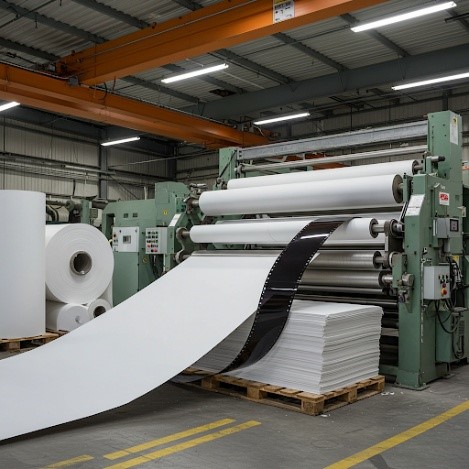
Paper & Packaging
Application: Cutting large paper rolls or cardboard sheets into smaller widths for printing, packaging, and labeling.
Benefits:
✔️ Reduce material waste to as little as 1% or less
✔️ Minimize edge trim and scrap costs
✔️ Increase machine efficiency and output

Plastics & Film
Application: Cutting rolls and sheets of plastic, films, and flexible packaging materials for various applications.
Benefits:
✔️ Reduce material loss from pattern inefficiencies
✔️ Optimize roll utilization for cost savings
✔️ Improve production scheduling

Wood & Construction Materials
Application: Cutting wood planks, plywood sheets, and composite materials for furniture, flooring, and construction.
Benefits:
✔️ Maximize material usage while minimizing sawdust and offcuts
✔️ Optimize panel cutting layouts for fewer raw material changes
✔️ Reduce costs and environmental impact

Cable & Wire Manufacturing
Application: Cutting cables, electrical wiring, fiber optics, and tubing to precise lengths for manufacturing and installation.
Benefits:
✔️ Reduce excess material waste when cutting to length
✔️ Minimize production downtime with efficient cutting patterns
✔️ Improve inventory management by optimizing stock usage
Is your industry not listed?
CutsBest is highly flexible and can be tailored to meet your specific cutting needs. Contact us to discuss your unique challenges!
Read more about CutsBest :
Key Optimization Considerations in Cutting Stock Problems
Let’s Optimize Your Cutting Process
Talk to our experts about how CutsBest can help you reduce waste and increase savings.
Call 312-988-7422 | email: This email address is being protected from spambots. You need JavaScript enabled to view it.
What’sBest! 20 Excel Add-In – New Features:
1) General:
- Now support latest Excel functions such as NORM.DIST, BINOM.DIST, POISSON.DIST, LOGNORM.DIST, etc.
- Improved support of the WBALLDIFF constraint to better handle accidental fractional values.
- More concise Model/Solution Summary Report to help understanding of solutions to big models.
- Time-to-Best Solution now displayed in solve Status Report.
- More concise listing of non default options in Status Report.
2) LP (Linear Program) Solvers:
- New enhancements to simplex solvers improve the average performance on large instances by 25-30%.
3) MIP (Mixed Integer Program) Solvers:
- New heuristics at root node help find good quality solutions for previously unsolvable instances.
- Enhancements in re-optimizations lead to optimality 15-20% faster compared to the previous version.
- From our standard benchmark suite, the number of models solved to optimality within 2 hrs increased by 20% compared to the previous version.
4) NLP (Nonlinear Program) Solvers:
- Interface to open source NLOPT solver suite.
- Improved performance due to better recovery strategies on difficult nonlinear problems.
- Improved Mult-Start solver based on entropy maximization.
- Global solver solution path repeatability improved.
- Global solver has improved ability to
convert nonlinear models to equivalent linear models,
recognize and substitute out common terms. - Global solver has better bound tightening and tighter linear relaxations.
5) Interfaces:
- Improved support for external solvers such as COPT, Coin/CLP, Highs.
CutsBest
Key Optimization Considerations in Cutting Stock Problems
CutsBest is designed to handle a wide range of real-world complexities in optimizing material usage. Below are some of the key factors that CutsBest considers:
1. Cost Optimization
- Minimizing Raw Material Costs – The primary goal is to reduce the total cost of raw materials by optimizing cutting patterns.
- Machine Usage Costs – CutsBest considers operational costs and encourages solutions that efficiently use wide raw material widths.
- Setup & Order Splitting Costs – Reducing the cost of switching between patterns and minimizing consolidation efforts for shipments.
2. Material Constraints & Availability
- Limited Raw Material Supply – The software accounts for finite inventory levels and prevents cutting beyond available stock.
- Minimum Order Quantities – If raw materials must be ordered in bulk, CutsBest ensures compliance with supplier minimums.
- Bundles of Raw Material – Some materials, such as steel rods, are shipped in fixed bundle sizes, requiring cuts to align with bundle quantities.
3. Cutting & Waste Management
- Kerf (Cut Waste) – When using saws instead of shears, the system factors in material lost during cutting.
- Edge Waste vs. Overage Waste – CutsBest balances leftover raw material against excess finished goods to optimize future usage.
- Minimum & Maximum Edge Waste – Some industries need to restrict edge waste for handling and disposal efficiency.
4. Production Flexibility
- Material-Specific Products – Ensures that different materials (e.g., varying thickness or surface finish) are not mixed in the same cutting pattern.
- Upgrading Costs – When beneficial, CutsBest allows for using higher-grade material to reduce waste or improve efficiency.
- Stock Width Change Costs – Pattern changes that require switching raw material widths take longer, so the system favors solutions minimizing these changes.
5. Production Scheduling & Logistics
- Due Dates & Sequencing – Prioritizes urgent orders and sequences production for faster fulfillment.
- Inventory Restrictions – Aims to consolidate customer orders into fewer cutting patterns to minimize work-in-process inventory.
- Limit on Pattern Changes – In industries like paper manufacturing, frequent pattern changes slow production; CutsBest optimizes batch processing.
- Pattern Restrictions – Limits the number of widths per pattern to meet industry constraints (e.g., take-up reels in paper mills).
- Pattern Pairing – In certain manufacturing setups, two cuts must be made simultaneously (e.g., plastic wrap or paper production with defects).
6. Advanced Optimization Considerations
- Raw Material Library Selection – Helps manufacturers decide the best standard raw material lengths to stock based on demand forecasts.
- Order Splitting Costs – Balances the cost of producing a demand width across multiple patterns against consolidation costs.
- Two-Dimensional Cutting – Supports cutting layouts for sheet-based materials like plywood, fabric, or corrugated paper.
Read more about CutsBest :
Who Can Benefit from CutsBest?
Let’s Optimize Your Cutting Process
Talk to our experts about how CutsBest can help you reduce waste and increase savings.
Call 312-988-7422 | email: This email address is being protected from spambots. You need JavaScript enabled to view it.
| Support: (312)988-9421 | © 2026 LINDO Systems, Inc. |  |
| Contact | Privacy policy | Acknowledgements | FAQ |